
PlayinMatch Withdrawal Time — Official 2-3 Hour Window, Account Tab to Your Bank
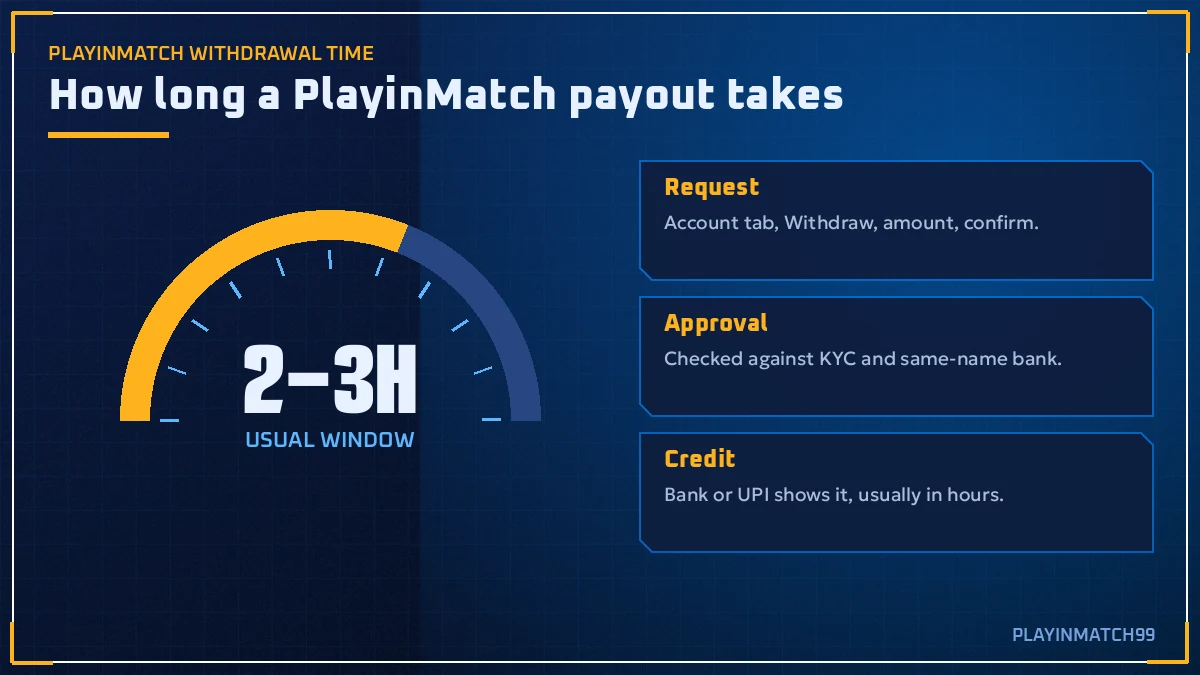
Start the clock when you tap submit in the PlayinMatch Account tab and stop it when your own bank app shows the credit: PlayinMatch quotes 2-3 hours for that stretch. UPI tends to beat it. A wrong IFSC code, or money still locked in an unsettled cricket market, will not.
So the short answer is a couple of hours. The longer answer depends on four things you can actually control: whose name is on the bank account, whether your KYC is done, whether money is still locked in open bets, and when you press the button. Get those right and PlayinMatch payouts are boring. Boring is good.

PlayinMatch Withdrawal Time by Method — Real Windows for UPI, IMPS and Net Banking
PlayinMatch does not publish a stopwatch figure for each payout route. What it does publish is one line in its FAQ: withdrawals usually show in your account within 2-3 hours, depending on the method. Everything below hangs off that line, so read the ladder as typical, not promised.
- UPI (GPay, PhonePe, Paytm)Usually the quickest leg once PlayinMatch approves the request. On a normal weekday afternoon it tends to sit at the short end of the 2-3 hour band.
- IMPS / Net BankingClose to UPI in practice. The bank that receives the money decides when it posts, so a slow bank adds minutes, sometimes more.
- Card or wallet (VISA, Skrill)Listed as payment options on PlayinMatch, but check in the cashier whether they are offered for payouts on your ID. If they are, expect the slower end. Hard to say more than that.
- First withdrawalKYC gets reviewed before anything moves. This is the one that most often runs past three hours.
- Bank holiday or post-IPL rushLongest of the lot. The request queues fine, the bank side just posts late.
One honest caveat. The 2-3 hour figure is the time until the money shows, not the time until PlayinMatch clicks approve. Your bank app may lag behind the actual credit by a few minutes, so refresh before you panic.
Why is a deposit so much quicker than a payout? Money going in only has to be matched to your ID, and the PlayinMatch balance updates in real time once UPI confirms. Money going out has to be checked against a name, an account and your open exposure before anyone releases it. Different direction, different checks. Deposits in minutes and withdrawals in a couple of hours is the normal shape, not a sign that something is off.
PlayinMatch Withdrawal Status — Clear Meaning of Request, Approve and Credit
Every PlayinMatch withdrawal moves through the same three stages, the ones on the tracker at the top of this page. The exact wording on your screen may differ a little (lobby labels do change), but the logic does not.
PlayinMatch Request Stage — Instant Log
You pick the amount and the bank account, then submit. PlayinMatch removes that sum from your available balance straight away, which is why your balance drops before the bank shows anything.
PlayinMatch Approval Stage — Verified Checks
The name on the bank account is compared with your KYC name, and open exposure is checked. Most of the waiting happens here on a first payout.
PlayinMatch Credit Stage — Real Bank Posting
Money leaves PlayinMatch and your bank posts it. UPI and IMPS usually post fast; a bank on maintenance does not.
If a request sits at the first stage for well over three hours, that is worth a live chat message. Sitting at the last stage usually means the bank, not PlayinMatch.
A rejected PlayinMatch request is not lost money. The amount returns to your wallet, usually with a short reason, and you can correct the detail and submit a fresh request. Read the reason before you retry, otherwise the second attempt fails for the same thing.
How to Request a PlayinMatch Withdrawal — Quick Steps From the Account Tab
The whole thing lives behind the Account item on the bottom nav (the row that reads Exch · Sports · Home · In-Play · Account on mobile). Log in first through the PlayinMatch com mobile login screen, then work through this:
Open Account. Tap the last icon on the PlayinMatch bottom bar. On desktop, the same options sit under your user name.
Read two numbers. Your total balance and the amount you can actually withdraw. If they differ, money is parked in open bets.
Choose the withdrawal option. PlayinMatch lists the available payout methods and the minimum for each one right there.
Add or pick your bank account. It must be in your own name. Type the IFSC code carefully, one wrong character and the transfer bounces.
Enter the amount and submit. Note the time. Screenshot the reference if one appears.
Wait out the window. Give it the full 2-3 hours before you chase anything, longer if it is your first PlayinMatch withdrawal.
Quick one: do not submit the same request twice because the first seems slow. Two requests for the same money just give the PlayinMatch cashier two things to untangle, and the second one will likely be rejected anyway.
App or browser, it does not matter. The PlayinMatch app, the mobile site and the desktop lobby all run the same cashier, and a request placed in one shows in the others because it is one account and one wallet. If you normally play on the PlayinMatch app download build and it will not open one evening, log in through the browser and withdraw from there; nothing about the timing changes.
And if playinmatch99.com will not load while a payout is pending? The request has not vanished. Open playinmatch.net, playinmatch.app or playinmatch99.now instead (Indian networks block betting addresses now and then, which is why PlayinMatch runs more than one), sign in with the same ID, and the pending line sits in Account exactly where you left it.
PlayinMatch First Withdrawal and KYC — Verified Name, Faster Payouts Later
Your first PlayinMatch withdrawal is the slow one. Nearly always.
Here is the lopsided bit. A new PlayinMatch ID can deposit by UPI and see the balance jump within minutes, no questions asked. Then the first cash-out arrives and suddenly there is a queue, because this is the moment the account holder, the uploaded documents and the freshly added bank account get compared side by side for the first time. Nothing went wrong. The check simply lives on the way out, not the way in, and a first-timer who did not expect it reads the wait as a problem.
The fix is dull but it works: finish KYC before you need the money. The KYC page is linked from the footer of the official PlayinMatch site and from your account area. Upload clear documents, make sure the spelling of your name matches your bank passbook, and wait for the approval before your first big request.
Name match, spelled out. "Rahul K Sharma" on the bank and "Rahul Kumar Sharma" on KYC can be enough to hold a PlayinMatch payout for a manual look. Not always. But often enough that it is worth fixing up front.
After KYC is cleared, later PlayinMatch withdrawals usually drop back into the normal 2-3 hour band. I said the first one is slow; to be precise, it is the review that is slow, not the transfer itself. Once the review is done it stays done.
PlayinMatch Withdrawal Time — Verified Keyword Ledger for Every Payout Search
People who search PlayinMatch withdrawal time usually arrive from a longer trail of searches about the same account, so this ledger lines them up in one place. PlayinMatch, PlayinMatch99 and PlayinMatch 99 all point to one brand and one wallet, and the payout rules on this page apply whichever name you typed.
PlayinMatch Payout and Trust Searches — Clear Answers | |
|---|---|
| PlayinMatch withdrawal time | The number this page tracks, from submit in Account to credit in your bank app. |
| Is PlayinMatch safe | Payouts go only to a same-name bank account, which is the check most players ask about first. |
| PlayinMatch customer care number India 24/7 | Live chat inside the account is the main support route for a stuck payout. |
PlayinMatch App and Login Searches — Fast Access | |
| PlayinMatch app download, PlayinMatch app, PlayinMatch apk | The withdrawal flow in the app matches the browser flow step for step. |
| PlayinMatch install and PlayinMatch download | Once the file is installed, the cashier sits under the same Account tab. |
| PlayinMatch com mobile and PlayinMatch com mobile login | The mobile site is where most requests start: log in, open Account, withdraw. |
| PlayinMatch live app and PlayinMatch99 com | Whichever door you use, a withdrawal requested there joins one queue. |
| PlayinMatch 247 and join PlayinMatch | The 247 search comes from the old Playinexch247 sign-in name; joining starts with a mobile number and a 6-digit OTP. |
PlayinMatch Games and Markets Searches — Live Lobby | |
| PlayinMatch online and PlayinMatch online live sports | Cricket, football and tennis winnings land in the same withdrawable balance. |
| PlayinMatch exchange and PlayinMatch live score today | Open exchange bets hold funds until the market settles. |
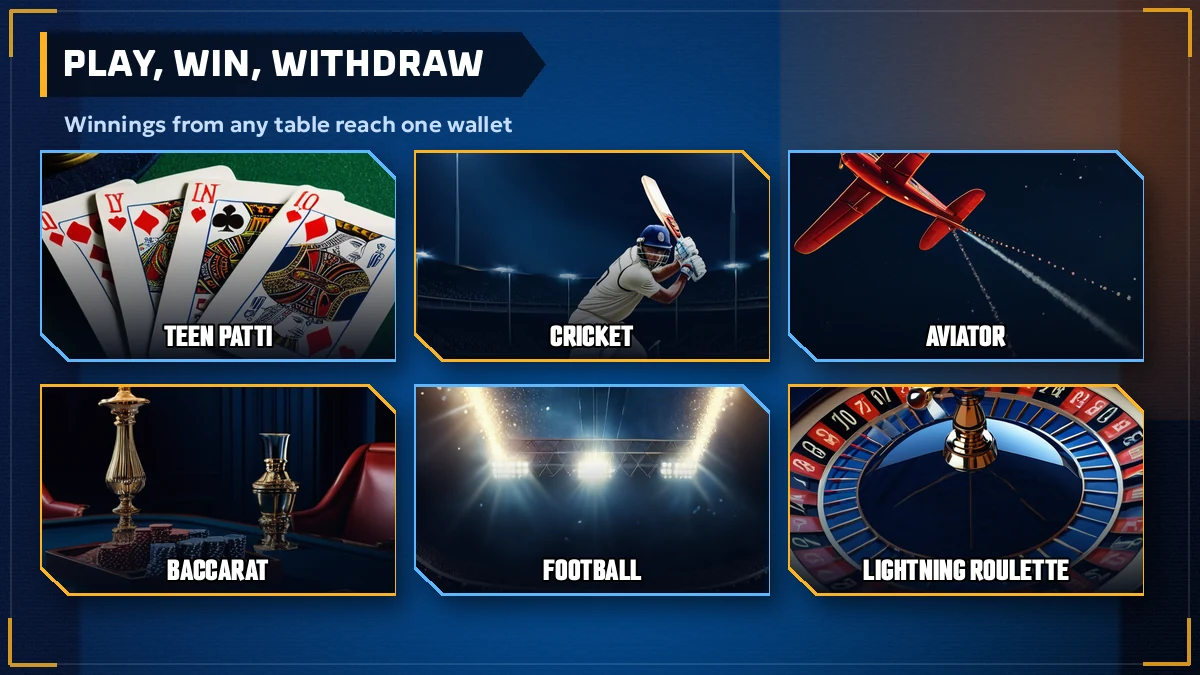
| PlayinMatch casino, PlayinMatch game, PlayinMatch aviator | Casino and crash-game wins are withdrawn the same way as sports wins. |
| PlayinMatch com slots | Slot balances join the main wallet and follow the same payout window. |
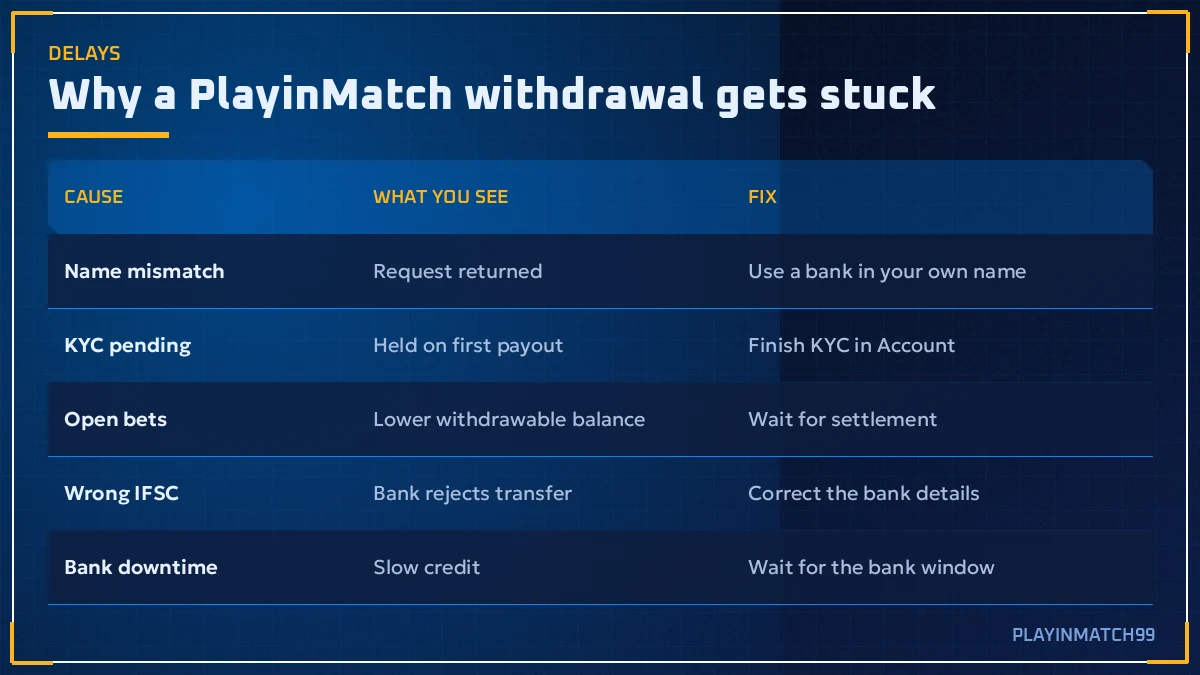
PlayinMatch Withdrawal Problem Causes — Clear Fixes for Six Common Delays
Searches for a PlayinMatch withdrawal problem spike every time someone waits four hours instead of two. Almost every one of those waits traces back to a short list, and each item has a specific fix. Here it is.
| Cause | What you notice | Fix |
|---|---|---|
| Name mismatch | Request held or rejected, balance returned | Add a bank account in your exact KYC name, then request again |
| Pending KYC | First payout stuck at the approval stage | Finish or re-upload KYC documents; wait for approval |
| Open bets | Withdrawable amount lower than balance | Let the market settle, then withdraw the freed amount |
| Wrong IFSC | Transfer bounces back after hours | Correct the IFSC on the saved bank account and resubmit |
| Bank downtime | Approved on PlayinMatch, nothing in the bank yet | Wait for the bank to post; keep the reference handy |
| First withdrawal | Slower than the 2-3 hour norm | Expected once; later requests usually run faster |
Notice what is not on the list: PlayinMatch simply deciding not to pay. In practice the delays are mechanical. A wrong character in an IFSC code is by far the most annoying, because the money leaves, travels, bounces, and returns to the the PlayinMatch wallet hours later, and only then can you fix it and try again.
Open bets deserve a second line because they confuse more PlayinMatch players than anything else. On the exchange, a back or lay bet that has not settled keeps its liability locked, and the sportsbook does the same with an unsettled stake. Your total balance includes that locked money; your withdrawable balance does not. The MultiMarket view is the fastest way to see every open position on one screen, so check there before you assume the cashier is wrong. Once the match finishes, the lock lifts on its own.
Casino rounds are different. A Teen Patti hand or an Aviator round settles in seconds, so live casino play rarely holds money for long. If your withdrawable amount is short after a session at the Live-Casino tab, its almost always a cricket or football market still running somewhere in the background.
PlayinMatch Withdrawal Problem Today — Real Checks Before You Trust a Telegram Rumour
A forwarded line in a group chat is not a status page. Your PlayinMatch Account tab is. The rumour might come from a real slow evening, or from one person whose bank name did not match and who then posted in six groups at once; from the outside those two look identical. So skip the guessing and read your own screen, in this order:
Check the clock. Has it actually been more than 2-3 hours? Count from submission, not from when you started worrying.
Check the status. Pending, approved or rejected. Rejected with the money back in your wallet is a fixable detail, not a freeze.
Check the calendar. Is it a bank holiday, a Sunday, or the morning after an IPL final? Then the queue is just long.
Check your bank. UPI apps and net banking have their own outages. If your bank is down, no payout from anywhere will land.
Check the official PlayinMatch channels. The brand uses its community channels for updates. If there is a real system issue, it tends to show there first.
If all five come back clean and the request is still pending, then yes, take it to live chat. Screenshots from a group do not help the support team; your user ID and request time do.
One more source of confusion: the name change. PlayinMatch used to be Playinexch, and a notice dated 21 December 2024 says Playinexch.com became Playinmatch.com with accounts carried over. Older rumours about "Playinexch withdrawals" still circulate and get pasted into new groups as if they were fresh. Check the date on anything you read.
PlayinMatch Withdrawal Time After IPL Nights — Reliable Timing for Busy Queues
An IPL evening on PlayinMatch ends with thousands of settled markets at roughly the same moment. A decent share of those winners open the Account tab before the post-match presentation finishes. The official FAQ itself says payouts slow down after big nights, and it is easy to see why: every request goes through the same checks, one queue.
What that means for you, practically: a PlayinMatch withdrawal placed at 11:40 pm after a last-over finish will probably take longer then one placed at 3 pm the next day. Not dramatically longer on most nights. On a final, or a knockout that went to a Super Over, give it extra room.
There is a small trick here (not a secret, just timing). If you do not need the money tonight, submit after the rush clears. The request is identical, the checks are identical, you just are not standing in the longest part of the queue. PlayinMatch does not reward waiting, it simply stops penalising you for joining at the busiest minute.
PlayinMatch Withdrawal Time in India on Bank Holidays — Safe Planning Around Closures
PlayinMatch withdrawal time in India depends on Indian banks, and Indian banks keep holidays. The PlayinMatch side can accept and approve a request on Diwali or Holi; the credit step is where things slow down, since some banks batch and post late on closed days.
Requesting right before a long weekend
The request is logged and may be approved on PlayinMatch the same day, but the bank credit can slip until the bank reopens. This is the classic case where a payout looks "missing" for a day.
Requesting on a normal working day
The request, approval and bank posting all happen inside ordinary hours. This is where the usual 2-3 hour PlayinMatch figure holds best.
Roughly: if you know you will need the money on a holiday, withdraw a day or two early. That is the only planning trick that genuinely helps.
PlayinMatch Withdrawal Limits — Official Minimums Shown Live in the Cashier
PlayinMatch lists the minimum and maximum withdrawal amounts inside the cashier, next to each payout method, after you log in. Those numbers are not printed on the public pages, and they can change, so any figure you read in a Telegram group or a random blog may already be out of date. Read the limit on the withdrawal screen of your own PlayinMatch account the moment before you submit. If your amount is under the minimum, the button simply will not accept it; if it is over a per-request maximum, split it into two requests and space them out.
Limits are also why a promised figure from a stranger is worthless. Offers, bonus terms and withdrawal caps on PlayinMatch are listed after login and they change often. The cashier on your own screen is the only version that counts.
PlayinMatch Withdrawal Support — Fast Escalation Through Live Chat
Live chat is the main PlayinMatch support channel, and it is where a stuck payout should go once the normal window has passed. Before you type, collect four details so the agent can find the request in one look.
Your PlayinMatch user ID or registered mobile number.
The exact amount requested.
The date and time you submitted it.
The payout method and the last four digits of the bank account.
Send those in one message instead of four. It saves a round of back-and-forth, and on a busy IPL night that round-trip alone can add twenty minutes. Our PlayinMatch customer care page lists every contact route, and if your worry is the brand itself rather than one payout, is PlayinMatch safe covers that ground separately.
Never share your password or an OTP in chat. Support does not need either one to trace a withdrawal, and nobody genuine from PlayinMatch will ask for them.
PlayinMatch Withdrawal Time in Practice — A Real Two-Hour Payout Walkthrough
A typical case, pieced together from how these requests normally run. A player in Pune finishes a Sunday afternoon on the PlayinMatch exchange, waits for the last cricket market to settle, and requests a UPI withdrawal at 4:10 pm to an account in his own name, KYC done months ago. Status shows approved a little later; his bank app shows the credit at about 6 pm. No chat, no drama.
Change one detail, say a brand-new ID and a first withdrawal, and the same request could stretch into the evening while KYC is checked. Change another, say an IFSC typo, and it bounces back untill the next morning. The PlayinMatch process is the same in all three; the inputs are what differ. That is really the whole point of this page, said once more: fix the inputs and PlayinMatch withdrawal time mostly takes care of itself.

PlayinMatch Withdrawal Time FAQ — Clear Answers to Top Payout Questions
How long does PlayinMatch withdrawal take?
Give a PlayinMatch payout 2-3 hours before you worry. That is the range the brand FAQ quotes, measured from submitting in the Account tab to the credit showing in your bank app. UPI usually lands near the short end, while a first payout under review or a request placed on a bank holiday can run past it.
Why is my PlayinMatch withdrawal not received yet?
Look at the status first. Rejected means the money is back in your PlayinMatch wallet with a reason such as a name mismatch or a wrong IFSC. Approved but not credited points to your bank posting late. Still pending well past three hours, often on a first payout, is when to message live chat with your request time.
Is KYC required for PlayinMatch withdrawal?
Yes, and it matters most once. Your first PlayinMatch payout triggers a review of your documents against the bank account holder name, and that review is the slow part. Upload KYC before you need the money, keep the spelling identical to your passbook, and later withdrawals usually avoid that extra wait.
What is the minimum withdrawal amount on PlayinMatch?
There is no fixed public figure. Log in, open Account, choose a payout method, and PlayinMatch prints the lower and upper amount for that method right on the withdrawal screen. Those numbers are updated from time to time, so trust what your screen says today over any number quoted in a group chat or old post.
Can I withdraw PlayinMatch money to another person's bank account?
No. PlayinMatch sends withdrawals only to a bank account held in the same name as your verified account. A payout to a friend, parent or spouse gets held or rejected because the names do not match. Add your own account, with the correct IFSC code, before you request the money.
Does PlayinMatch process withdrawals on bank holidays?
You can place a PlayinMatch withdrawal request on any day, but bank holidays slow the last step because the receiving bank may post the credit late. Expect a longer wait than the usual 2-3 hours. Requests made just before a long weekend are the ones most likely to spill over.
Why can I not withdraw my full PlayinMatch balance?
Open bets on PlayinMatch hold part of your balance until the market settles, so the withdrawable figure can be lower than the total you see. Wait for the match or market to settle, or check exposure in the Account tab. After settlement the freed amount can be requested normally.
How do I contact PlayinMatch about a stuck withdrawal?
Use PlayinMatch live chat, which is the main support channel. Give your user ID, the amount, the time of the request and the payout method in one message. Wait until the 2-3 hour window has passed before you chase it, unless the status shows rejected or on hold.
PlayinMatch Withdrawal Searches — Popular Payout Queries From India
- playinmatch withdrawal time
- playinmatch withdrawal problem
- playinmatch withdrawal time in india
- playinmatch withdrawal problem today
- playinmatch withdrawal kitne time me aata hai
- playinmatch withdrawal pending
- playinmatch paise kaise nikale
- playinmatch withdrawal kaise kare
- playinmatch99 withdrawal
- playinmatch minimum withdrawal
- playinmatch kyc
- playinmatch withdrawal not received